| View Issue Details [ Jump to Notes ] | [ Print ] | ||||||||
| ID | Project | Category | View Status | Date Submitted | Last Update | ||||
| 0009926 | ParaView | Bug | public | 2009-11-19 14:59 | 2010-12-20 16:10 | ||||
| Reporter | Alan Scott | ||||||||
| Assigned To | Robert Maynard | ||||||||
| Priority | normal | Severity | minor | Reproducibility | have not tried | ||||
| Status | closed | Resolution | fixed | ||||||
| Platform | OS | OS Version | |||||||
| Product Version | |||||||||
| Target Version | 3.10 | Fixed in Version | |||||||
| Summary | 0009926: Surfaces and overlapping lines are displaced. | ||||||||
| Description | Here is a bug from the mail group - Benjamin Schindler [bschindler@inf.ethz.ch]: This is a known issue. This happens due to the coincident topology resolution techniques employed to rendering surfaces with overlapping lines correctly. We are working on a fix for this issue. Utkarsh > > I have a very odd problem with paraview 3.6.1 (debug build directly from sources): > > When displaying different objects, they are not properly laid into space, probably due to projection problems. One way to very easily see this is to display a line and then use the spreadsheet view to select a vertex of that line. The purple dot which highlights the point is then not on the vertex itself, but at some offset which varies depending on the viewing direction. I took a screenshot (and taking the screenshot itself changed the position of the highlight it seemed) to illustrate the problem. > This is extremely annoying as also datasets/lines are not properly laid into space so there is no way to tell how the two objects relate to each other. The same problem happens when selecting objects (see second screenshot) > Is this a known issue/is there already a fix for this? | ||||||||
| Tags | No tags attached. | ||||||||
| Project | |||||||||
| Topic Name | |||||||||
| Type | |||||||||
| Attached Files | 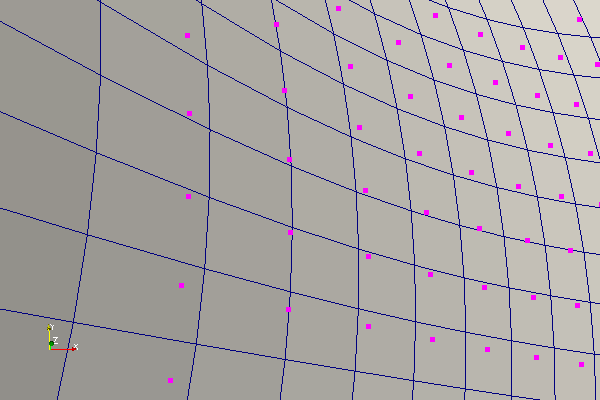 strange2.png [^] (11,824 bytes) 2009-11-19 15:04 strange2.png [^] (11,824 bytes) 2009-11-19 15:04
| ||||||||
| Relationships | |
| Relationships |
| Notes | |
|
(0020426) Utkarsh Ayachit (administrator) 2010-04-27 10:52 |
A simple solution is to add UI to the Edit |Settings dialog to allow the user to play with the z-offset settings. |
|
(0024282) Robert Maynard (developer) 2010-12-20 09:26 |
Z offset is controllable in the edit settings in 3.10.0. |
|
(0024294) Alan Scott (manager) 2010-12-20 16:10 |
This isn't a perfect solution, but I don't think there is one. Thus, I am declaring this closed. Tested Linux client, remote server, trunk. I changed the z offset to do nothing. |
| Notes |
| Issue History | |||
| Date Modified | Username | Field | Change |
| 2009-11-19 14:59 | Alan Scott | New Issue | |
| 2009-11-19 15:02 | Alan Scott | Description Updated | |
| 2009-11-19 15:04 | Alan Scott | File Added: strange2.png | |
| 2010-02-01 14:22 | Utkarsh Ayachit | Priority | normal => immediate |
| 2010-02-01 14:22 | Utkarsh Ayachit | Target Version | => 3.8 |
| 2010-03-17 15:23 | Utkarsh Ayachit | Status | backlog => tabled |
| 2010-03-17 15:23 | Utkarsh Ayachit | Assigned To | => Utkarsh Ayachit |
| 2010-04-07 13:38 | Utkarsh Ayachit | Assigned To | Utkarsh Ayachit => Robert Maynard |
| 2010-04-07 13:38 | Utkarsh Ayachit | Priority | immediate => normal |
| 2010-04-16 01:23 | Utkarsh Ayachit | Target Version | 3.8 => 3.8.2 |
| 2010-04-27 10:52 | Utkarsh Ayachit | Note Added: 0020426 | |
| 2010-06-10 14:42 | Utkarsh Ayachit | Target Version | 3.8.2 => 3.10 |
| 2010-12-20 09:26 | Robert Maynard | Note Added: 0024282 | |
| 2010-12-20 09:26 | Robert Maynard | Status | tabled => @80@ |
| 2010-12-20 09:26 | Robert Maynard | Resolution | open => fixed |
| 2010-12-20 16:10 | Alan Scott | Note Added: 0024294 | |
| 2010-12-20 16:10 | Alan Scott | Status | @80@ => closed |
| Issue History |
| Copyright © 2000 - 2018 MantisBT Team |